Colour and terminals
A Program finds out how many colours the terminal supports and whether its background is light or dark. Every Style follows both, with no code in your model.
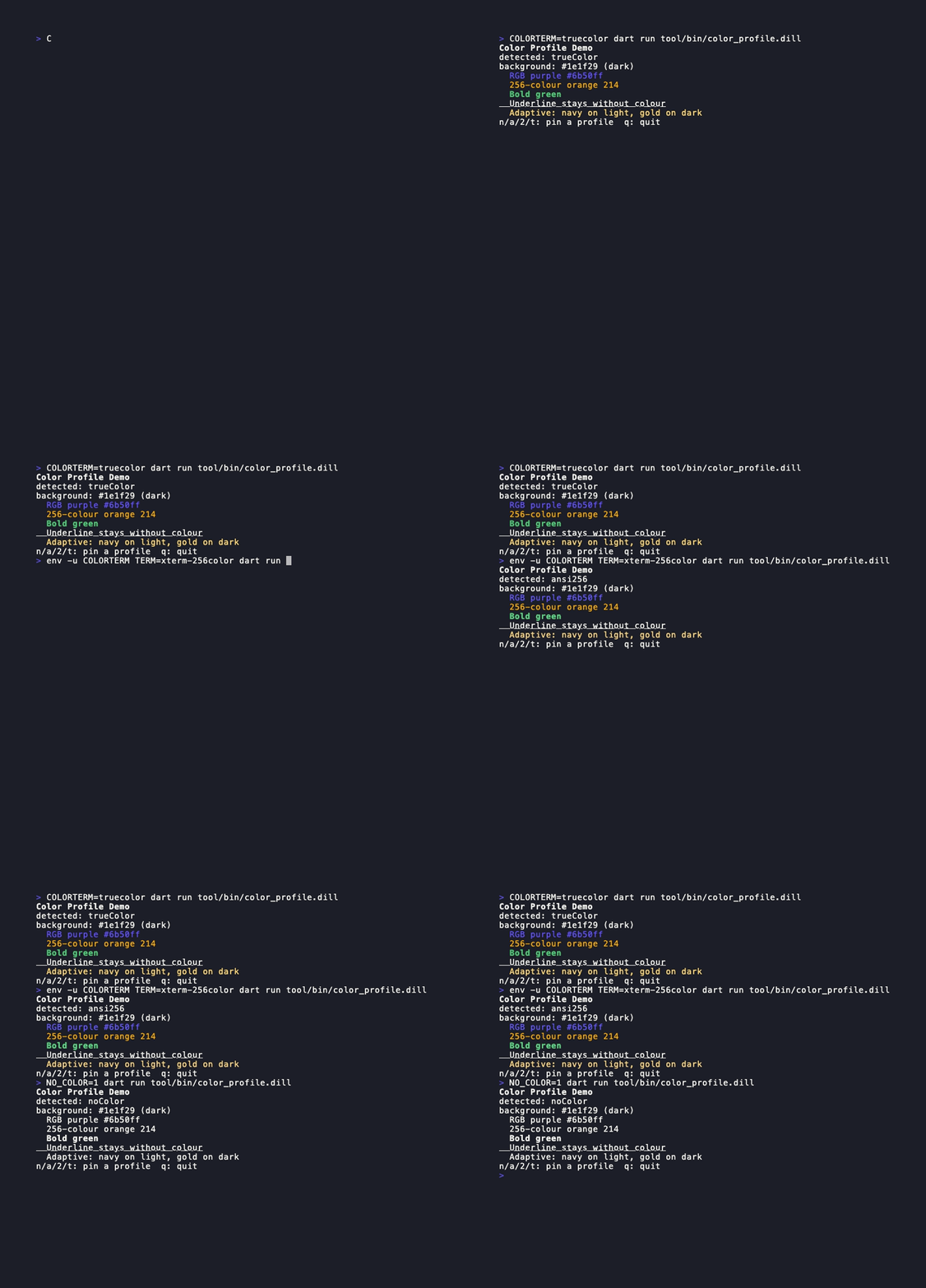
What the Program does
When a Program writes to the real stdout, it calls detectColorProfile() at startup and sets Style.defaultProfile for the run. Each Style without its own profile uses that value, so RGB colours step down to 256 colours, to 16 colours, or to no colour. This includes border, margin and underline colours, and gradientText / gradientBackground. Bold, italic and underline stay. Your model also gets the value as ColorProfileMsg. When the run ends, the previous value comes back, also when update throws or SIGTERM stops the program.
Detection rules
The first rule that matches wins. The rules follow charmbracelet/colorprofile, plus FORCE_COLOR and TERM_PROGRAM.
| Environment | Profile |
|---|---|
FORCE_COLOR=1 (or any non-zero value) | at least ansi, also when output is not a terminal |
FORCE_COLOR=2 / FORCE_COLOR=3 | at least ansi256 / trueColor |
NO_COLOR set to any non-empty value | noColor |
CLICOLOR_FORCE (same levels as FORCE_COLOR) | forces colour, but NO_COLOR wins |
Output is not a terminal, or TERM=dumb | noColor |
COLORTERM=truecolor or 24bit | trueColor |
kitty, Ghostty, WezTerm, Alacritty, iTerm2, VS Code, Windows Terminal (WT_SESSION) | trueColor |
TERM ending in 256color, tmux, screen, Apple Terminal | ansi256 |
| Anything else | ansi |
FORCE_COLOR sets a minimum. FORCE_COLOR=1 in a true-colour terminal still gives trueColor. FORCE_COLOR=0 and false do not force anything.Light and dark backgrounds
AdaptiveColor picks its light or dark value. It uses the style's own background when the style has one. If not, it uses Style.hasDarkBackground. That value starts from COLORFGBG (for example 15;0 is dark) and is otherwise dark. The Program asks the terminal for its background colour at startup (OSC 11). When the reply arrives as BackgroundColorMsg, the Program updates Style.hasDarkBackground before your update sees the message, so the next frame uses the correct variant.
const accent = Style(
  adaptiveForeground: AdaptiveColor(
    light: RgbColor(30, 30, 160), // navy on a light terminal
    dark: RgbColor(255, 220, 120), // gold on a dark terminal
  ),
);
Override the profile
Pin a profile for the whole run with withColorProfile, or for one style with Style(profile: ...). A style's own profile always wins.
await Program(options: [
  withColorProfile(ColorProfile.ansi256),
]).run(MyModel());

final plain = Style(profile: ColorProfile.noColor).bold();
Outside a Program, styles use trueColor, or noColor when NO_COLOR is set. A script that prints styled text can opt in to detection:
Style.defaultProfile = detectColorProfile();
print(const Style().foregroundColorRgb(107, 80, 255).render('Hello'));
Pin a profile in tests
A Program that writes to a custom sink (withOutput) does not detect anything. It uses trueColor, so golden frames do not change with the machine that runs them. To test another profile, add withColorProfile. To test detection itself, call detectColorProfile with an explicit environment:
expect(
  detectColorProfile(
    environment: {'TERM': 'xterm-256color'},
    isTerminal: true,
  ),
  ColorProfile.ansi256,
);

await Program(options: [
  withOutput(sink),
  withColorProfile(ColorProfile.noColor),
]).run(MyModel());
Style.defaultProfile and Style.hasDarkBackground are shared by the whole isolate. A test that sets them must restore them, for example in addTearDown. Programs that overlap in one isolate share them too.